如何将企业的品牌指南转变为内容工厂:用 Lovart Arti 搭一套 AI 内容引擎
原文链接: https://x.com/AmirMushich/status/2115868164965703747 来源: x.com 发现于: 小互 · AI 解读站 · 2026/10/31 说明: 本文由 AIHot 自动聚合(原文即中文,未翻译)。正文取自小互 AI 解读
全文 Markdown · 会员
作者:Amir Mušić10-31 · 9分钟
不少品牌和创作者手里都握着一套精美的“品牌视觉指南”(Brandbook)——规范好了 LOGO、字体和配色,但一到周一打开社交媒体后台,依然陷入空白:下周到底发什么?怎么保证发出来的东西不跑偏、像自家品牌?
在 Amir 整理的数十条 Reddit 讨论中,反复出现的痛点集中在三件事:找不到内容灵感(33.3%)、不知如何将死板的品牌指南落地到实际帖子(28.6%),以及无穷无尽的制作负荷(38.1%)。只把品牌资产锁在 PDF 里,解决不了这个问题,真正破局的方案是把品牌指南改造成一套自动运转的AI内容引擎:让 AI 定期完成品类研究并主动交来设计与文案草案,团队则把精力放在挑选、修改和发布上。
品牌设计师 Amir Mušić 用 Lovart 2.0 中的个人设计 Agent Arti,为概念鸡蛋品牌 oovie 跑通了这套工作流(本案例由 Lovart 赞助)。他把 22 页品牌手册里的规范接到日常流水线上:Arti 不仅能根据品牌资产构思料理选题与社媒版式,还能通过定时任务交出视觉看板和互动草案,甚至能记住对字形与食物写实质感的修改要求。
先让 AI 懂自家品牌,把修改变成下一次的要求
让 Arti 参与日常内容生产,要先给它一套已经确定的品牌依据。把品牌手册、LOGO、色板、字体规则等放进 Brand Kit(品牌资产库),需要时再补上产品照片。这样,当你让它做一张新海报时,它有现成的资产可引用,不必每次都靠一段文字重新猜品牌的长相。也可以把品牌手册发给 Arti,让它协助设置 Brand Kit。
品牌之外,还有团队在合作中形成的要求。这些交给 Agent Memory(记忆) 保存:在 Arti 页面开启 Auto-update memory(自动更新记忆),让已经确认的偏好与修改标准能够延续到新项目。记忆条目可以查看、编辑和删除,是否跨项目使用也由用户控制。
oovie 的一张海报,把这件事的价值展示得很具体。Arti 给出了名为 The yolk edit 的方向:粉色背景上,一只手像展示时尚单品一样拿着鸡蛋。Amir 喜欢这个创意,但标题里“edit”的字母“t”走形了,鸡蛋也不够真实。

图改好了,修改要求也留下来。 左为初版,中为修订版;右侧 Memory 保存了字形检查与食品真实感两项要求。图:Amir Mušić。
这次反馈没有停在“把图改一下”。Amir 还让 Arti 保存两条质量标准:
- 检查字形:最终版面要逐字检查,拒绝失真的 Space Grotesk 字体仿形。
- 保持食物真实:鸡蛋和其他食物要有真实质感,避免塑料感与不可能的结构。
随后,他打开一个没有先前对话和附件的新项目,Arti 重新取出了这两条要求。团队上次认真挑过的问题,便有了供下次复用的记录,少了一次从头交代。最终图片里的字形和食物仍需检查,保存标准并不等于免检。
(原文还建议开启 Self-evolving skills“自进化技能”。这是另一个可选功能:同一工作流跨项目重复使用超过三次后,Lovart 可将其提炼为技能,首次使用时向用户确认。它与保存偏好和反馈的 Memory 分工不同。)
让 AI 定期交来方案,把空白变成选择题
知道品牌长什么样以后,还要有人持续找参考、想话题、做出第一版。Scheduled Tasks(定时任务) 接住这部分工作:把研究对象、交付内容、频率和额度设好,Arti 就会按排期执行,把结果放进指定项目,等待团队挑选和发展。
Amir 的两次定时运行交出了两个很不同的方向:The yolk edit 将鸡蛋拍成时尚物件;Runny. Jammy. Set. 则把流心、半凝固、全熟的蛋黄并列,让熟度差异成为画面的主角。同一种产品,有了不同的说法,颜色、字标和整体气质又仍然属于 oovie。

同一颗鸡蛋,可以成为时尚单品,也可以用熟度差异讲一个话题。 这两张是作者两次定时任务的创意提案,均保留 oovie 的品牌视觉。图:Amir Mušić。
他随后公开了两份可换成自家品牌使用的任务模板。它们各自回答一个具体问题:Daily Moodboard 帮你找“视觉长什么样”,Brand Visual Radar 帮你想“对受众说什么”。
Daily Moodboard:先给团队一张有依据的视觉看板
假设你正在为 oovie 想下一组视觉,只有“再做点新鲜的”这句要求,很难开工。Daily Moodboard 会先找最多 3 份同品类的真实设计参考,优先看品牌与设计工作室的原始页面,打开图片,从每份参考里提取一条可借鉴的原则。
在作者展示的研究中,参考包括 Marigold Egg、Tamago Factory、Mori no Chikara 等相关包装案例。Arti 说明这些设计的构图、线条、文字或摄影怎样起作用,再用 oovie 的品牌身份重新探索。外部参考提供新思路,自家的品牌资产继续约束颜色、字体和视觉气质。

从真实参考提取方法,再转成自家品牌的视觉研究。 上方是参考案例,下方 A—C 是 oovie 的原创探索分区;左侧保留来源和分析。图:Amir Mušić。
这份任务最后交付的是 一张看板,每份参考对应一个 A—C 分区,并附来源链接、参考与分区的对应说明、实际尺寸和推荐方向。团队可以同时看着“借鉴了什么”和“放到我们品牌上会怎样”,再决定哪条路值得继续做。找参考与判断参考是否适用,由此接在了同一份提案里。
Brand Visual Radar:让一张社媒图有可参与的话题
社媒选题还要回答另一个问题:用户看到这张图,为什么愿意停下来、回答一句,或参与一下?Brand Visual Radar 会查看最多 3 个真实社媒帖子或营销活动,拆解它们让受众注意、学习、回答或尝试什么,再为自家品牌发展 3 个原创点子。
鸡蛋本身并不缺话题。Amir 最先给 Arti 的切入点是“每个人都有自己的早餐”,Arti 将其发展为 Different mornings(不同的早晨):半熟水煮蛋、法式蛋卷、吐司炒蛋、北非番茄炖蛋和水波蛋,分别对应不同晨间心情。它还提出 Slow Sunday 和 Wake up bold 两个备选方向。一种普通食材,开始有了一周甚至更长时间可以展开的内容。
“不同的早晨”把五种鸡蛋料理接到不同的心情和文案。 这是作者的一周内容计划展示片段;它说明产品怎样发展成话题,不是 Radar 模板单次生成的三份产物。视频:Amir Mušić。
视觉雷达进一步把内容落到受众能参与的形式上。作者展示了三种社媒图:
- 料理二选一(PICK YOUR SIDE):半熟蛋和煎蛋同时摆出来,请受众选自己喜欢的一边。
- 你点我做(YOU PICK. WE COOK.):用一张料理图和一处留白,征集大家下一道想吃什么。
- 局部猜做法(HOW WAS THIS COOKED?):只给蛋黄特写,再列出半熟、煎蛋、水波蛋三个选项,让受众猜。

先确定想让人怎样参与,再给每种内容安排构图。 图中的选项和空白框是静态排版,受众可在评论区回应;它们不是可点击的网页控件。图:Amir Mušić。
二选一要把选项摆清楚,猜谜要留下足够线索,征集意见要把问题问出来。每张图的构图都要服务它的内容。 模板因此要求分别生成 3 张独立的 4:5 视觉草案,每个点子附简短英文标题和不超过 50 词的配文,最后用表格对应点子、文案、图片文件与实际尺寸,并推荐一项继续发展。
团队收到的便是三种有理由、有文案、有图的选择,可以讨论哪一种更适合受众,再继续精修。
同一套品牌依据Brand Kit 资产 + 已保存的修改要求 ↓
视觉长什么样?
Daily Moodboard
最多 3 份真实设计参考 每份提炼一条原则 ABC交 1 张分区看板附出处、解释和推荐方向 对受众说什么?
Brand Visual Radar
最多 3 份真实社媒案例 发展 3 个原创内容点子 二选一你点我做猜做法交 3 张独立的 4:5 草案每项有标题、配文和图片
↓ 人来挑选、发展、核对和发布值得复用的修改要求,继续保存到 Memory
图示说明两份模板的交付要求;不表示同一次任务必须同时运行两种模板。
团队把精力转向挑选、发展和把关
Amir 自述,Arti 约两分钟给出了那五个早餐点子;他过去准备类似活动概念、做视觉方案并完成审批,大约需要 3—5 天。这两段时间对应不同的工作范围,能看见的变化是:团队更早拿到了具体候选,可以开始判断和修改。
看板上的参考是否适合品牌,三种互动里哪一个值得做,图片的字形与食物是否真实,文案里的产品事实是否准确——这些仍由人决定。AI 先把研究和初稿送到桌上,人的判断就有了可以落笔的对象。
小团队可以先从每周例会前的一条任务开始:附上获批的 Brand Kit,找少量相关参考,解释一个有潜力的方向,再交一份草案。先看这一轮结果有没有帮上忙,再调整频率和交付要求。为客户交付品牌时,也可以把 Brand Kit、首批设计和这两份任务模板一起交过去,让他们拿到品牌之后,知道下周怎样继续用。
第一轮怎么跑:选好模板,配置任务
配置一套定时委派任务并不复杂,核心在于设定清晰的检索边界与交付规格。
设置任务的五个步骤
- 新建任务:在 Lovart 侧边栏打开 Delegated tasks,点击 New task;
- 填入提示词:粘贴下方的模板,并将
[CATEGORY]替换为自家产品品类(如 oovie 使用eggs and egg-based breakfast products); - 关联品牌资产:点击 Add attachment → Select assets → Brand Kit,选中已经审核通过的品牌规范;
- 设置运行参数:选择执行频率(每日 Daily 或每周 Weekly),设定执行时间、生成结果存放的目标项目(destination project),并设置单次消耗额度(credit limit);
- 试跑并创建:官方当前的 Design delegation 入口提供创建前的 Test run;Amir 的演示是在创建后点击 Run now。按当前界面的入口先检查一轮结果,再让任务按排期重复。
Lovart 2.0 中 Delegated tasks 的配置界面与参数设定过程。
作者展示挂载 Brand Kit、选定目标项目与设置时间周期。视频:Amir Mušić。
模板一:Daily Moodboard(视觉灵感看板)
两份模板按本次目的选择其一:找视觉方向用 Moodboard,准备社媒选题用 Radar。发送所选模板的中文或英文即可,不必把两种语言都发一遍。将 [CATEGORY] 换成具体品类;两种语言的模板均要求输出英文说明、标题与文案,需要中文产物时可修改末尾的语言要求。
模板还限制最多两轮搜索、四个来源页面,要求保留真实来源、参考图和精确 URL,检查历史避免重复,并把发布、Memory 更新和排期调整留给用户。这些要求让下一轮结果有出处可查,也控制了任务范围。
Daily Moodboard 英文原版提示词(展开后可复制)
CATEGORY: [CATEGORY]

Act as a visual research partner for the brand in the attached Brand Kit. Use its approved identity and relevant brand Memory.

On each run:
1. Find up to three strong, real design references in this category: packaging, identity, photography, editorial or advertising. Prefer original brand and studio pages. Open the sources and inspect the images.
2. Give each reference an English title, its brand or creator, the exact source URL and one design principle worth exploring. Include actual reference images where supported, or direct image links alongside their sources.
3. Generate ONE board of original visual studies for the attached brand, with one panel per reference, labelled A-C. Explore the reference's composition, lighting, crop or material treatment through our own brand identity. Keep the brand's colours, visual character and tone. Create original interpretations.
4. Explain which reference informed each panel and recommend one direction to develop. Return the board's file link and actual dimensions.

Check available project history to keep each run varied. Keep research focused: up to two search passes and four source pages, then work with the examples verified. Strong evergreen design is welcome; include dates only when stated on the source. Copy source URLs exactly.

Write all commentary, display titles and generated copy in English. Generate one board, with no extra variants or video. Keep original brand assets intact and identify the output as visual studies for creative review. Leave publishing, Memory updates and schedule changes to the user.
Daily Moodboard 中文译文提示词(展开后可复制)
CATEGORY: [CATEGORY]

请作为所附 Brand Kit 中品牌的视觉研究搭档。请使用已获批的品牌规范和相关的品牌 Memory。

每次运行要求:
1. 在该品类中找到最多 3 个高质量的真实设计参考:包括包装、视觉识别、摄影、刊物排版或广告。优先选择品牌官网和设计工作室原作页面。打开来源并细致检查图片。
2. 为每个参考提供英文标题、品牌或创作者、精确来源 URL,以及一条值得探索的设计原则。在支持的地方附上实际参考图,或在来源旁附上直接图片链接。
3. 为所附品牌生成 1 张原创视觉研究看板,每个参考对应一个分区,标记为 A-C。通过我们自己的品牌识别,探索参考案例中的构图、光影、裁切或材质表现。严格保持品牌的色彩、视觉性格与语调,进行原创转译。
4. 解释每个分区借鉴了哪个参考,并推荐一个值得深入发展的方向。返回看板的文件链接及实际尺寸。

检查可用项目历史以保持每次运行的多样性。保持调研聚焦:最多执行 2 轮搜索并查阅 4 个来源页面,随后基于验证过的案例展开工作。欢迎经典的常青设计;仅在来源明确注明时包含日期。精确复制来源 URL。

所有解说、展示标题和生成文案均使用英文。总共生成 1 张看板,不生成额外变体或视频。保持原始品牌资产完好,并将产物标明为供创意评审使用的视觉研究。将发布、Memory 更新和排期调整的权限留给用户。
模板二:Brand Visual Radar(品牌视觉雷达)
此模板用于筹备日常社媒内容,研究同品类的参与方式,提交 3 套可供选择的图文草案。
Brand Visual Radar 英文原版提示词(展开后可复制)
CATEGORY: [CATEGORY]

Act as a social-content partner for the brand in the attached Brand Kit. Use its approved identity, available product assets and relevant brand Memory.

On each run:
1. Find up to three real social posts or campaigns in this category. Prefer original brand or agency sources. Open the examples and identify the content mechanism: what the audience is invited to notice, learn, answer or try. Include source links and actual reference images or image links where available.
2. Develop three original ideas for our brand. For each, give the audience occasion, the content premise, a suitable social format, a short English headline and a caption of up to 50 words. Use product facts confirmed in the Brand Kit.
3. Generate THREE separate 4:5 visual demos, one for each idea, using our brand identity and available assets. Make each image communicate its idea: a choice should show the options; a comparison should show both subjects; a guessing game should show a clear question and answer options. Give each format its own composition.
4. Review each demo against its premise. Return a table matching each idea to its headline, caption, image file link and actual dimensions. After showing all three, recommend one format to develop and include the exact research source URLs.

Check available project history to avoid repeating ideas and sources. Keep research focused: up to two search passes and four source pages. Recent work and useful evergreen examples are both welcome. Include dates only when visibly stated on the source, and copy URLs exactly.

Write all commentary, display titles and generated copy in English. Generate three demos in total, with no extra variants or video. Keep original brand assets intact. Leave publishing, Memory updates and schedule changes to the user.
Brand Visual Radar 中文译文提示词(展开后可复制)
CATEGORY: [CATEGORY]

请作为所附 Brand Kit 中品牌的社交内容搭档。请使用已获批的品牌规范、可用的产品资产和相关的品牌 Memory。

每次运行要求:
1. 在该品类中找到最多 3 个真实的社交媒体帖子或营销活动。优先选择品牌或代理机构的原作来源。打开案例并识别其内容机制:受众被引导去注意、学习、回答还是尝试什么。附上来源链接,并在可用时附上实际参考图或图片链接。
2. 为我们的品牌构思 3 个原创创意。针对每个创意,说明受众场景、内容前提、适用的社交格式、简短的英文标题以及不超过 50 词的配文。必须使用 Brand Kit 中确认过的产品事实。
3. 生成 3 张独立的 4:5 比例视觉演示图(每个创意对应一张),使用我们的品牌识别和可用资产。让每张图片准确传达其创意前提:二选一必须呈现选项;对比必须呈现两个主体;竞猜游戏必须呈现清晰的问题和备选答案。赋予每个版式专属的构图。
4. 对照各自的前提审查每个演示图。返回一个表格,将每个创意与标题、配文、图片文件链接和实际尺寸进行匹配。展示全部三项后,推荐一种值得深入发展的板式,并附上准确的调研来源 URL。

检查可用项目历史以避免重复创意和来源。保持调研聚焦:最多执行 2 轮搜索并查阅 4 个来源页面。近期作品与实用的常青案例均可。仅在来源明显标明时包含日期,精确复制 URL。

所有解说、展示标题和生成文案均使用英文。总共生成 3 张演示图,不生成额外变体或视频。保持原始品牌资产完好。将发布、Memory 更新和排期调整的权限留给用户。
两个补充工具:缺品牌资产时用 Skill,展示成果时用 Leaf
如果还没有一套可用的品牌规范,可以从 Amir 的开源 Brand System Skill 开始。它把简报、参考分析、品牌锚点、规范与后续设计接成分阶段的指令流程:先确定方向,再向外扩展;品牌简报、参考方向、Anchor Brand Kit 和 Brand Lock 四个关键节点需要确认,每次消耗额度生成前也要先提交生成计划。
使用时,打开仓库的 SKILL.md,点击 Raw 复制全文,粘贴到开启 Thinking Mode 的新 Lovart 项目,再按引导提供简报和主参考图。Brand Lock 的作用是给参考分配职责:场景参考提供构图、镜头与光线,品牌锚点决定 LOGO、字体、颜色,产品参考决定产品形状与包装细节,减少相互干扰。
(该 Skill 是独立社区项目,当前版本 v0.2.0-alpha,采用 CC BY 4.0,使用时需署名;流程中的角色约束仍需要检查结果。)
缺少品牌资产时,从这里开始AI 品牌生成Skill :用一张腌黄瓜汽水图,做出一整个品牌同作者前作:从参考图提取设计规则,建立品牌锚点,再为场景、品牌和包装参考分配控制权。阅读介绍文章 →
oovie 的品牌手册片段:后续内容有共同的视觉依据。 视频:Amir Mušić。
已有品牌手册或系列设计成果后,Leaf 可以提供一种翻页展示方式。把现成 PDF 或 JPG、PNG、WebP 图片放入页面,可以设置封面、纸张、比例、光影和翻页音效,把页面组织成一本可翻阅的电子画册。它适合提案和成果展示,无须把它当作前面内容生成流程的步骤。
页面声明文件留在设备,并提供 Export HTML 与 Record MP4 入口。本次已查看样书、键盘翻页与设置,未验证文件导入、导出或录制;前述 Lovart 内容生成、定时任务与记忆效果来自作者演示,本次未实跑这些任务。
来源How to turn brand guidelines into a content factory (with Lovart’s Arti agent)Amir Mušić·2026-10-29·查看主材料延伸Lovart Brand System Skill·Lovart 2.0: Meet Arti·Leaf — tactile page reader本站说明oovie 是概念品牌;原文为 Lovart 赞助案例。
LOVART ARTI · 品牌内容工作流
如何将企业的品牌指南转变为内容工厂:用 Lovart Arti 搭一套 AI 内容引擎
品牌手册规定了长什么样,却没回答下周发什么。让 Arti 定期交来有参考、有文案、有图的草案,团队就有了可以挑选和修改的起点。 Amir Mušić × 概念鸡蛋品牌 oovie · Lovart 赞助案例
品牌色、字体和 LOGO 已经齐全,找参考、想选题和制作初稿仍会周周重来。这套工作流把品牌依据、周期研究、草案交付和修改记录接到一起。
从共同依据,分成两条任务 **先交给 AI:**获批的 Brand Kit(手册、字体、色板、产品图)+已保存的品牌 Memory(偏好与修改要求)。
找视觉:Daily Moodboard
最多 3 份真实设计参考 → 每份提炼一条原则 → 用自家品牌身份重新探索。 交付 1 张 A—C 分区看板
来源与分区逐一对应,团队看得见借鉴依据,再选方向。
想话题:Brand Visual Radar
最多 3 个真实社媒案例 → 拆解受众如何参与 → 发展 3 个原创点子。 交付 3 张独立 4:5 草稿
每个点子配简短英文标题、50 词内配文及图片,推荐一项继续发展。
**两条路都交给团队:**挑选、发展、核实产品事实,检查字形与食物质感,然后决定发布。 **把修改留给下一轮:**oovie 初稿字母走形、鸡蛋不够真实。Amir 让 Arti 保存“逐字检查”和“食物写实”两条要求,随后在新项目中取回。标准可以复用,终稿仍要检查。
内容决定构图
料理二选一,把两边摆清楚;你点我做,留出征集问题;猜做法,给蛋黄特写和答案选项。让受众知道怎样参与,比同一版式换三段字更有用。
第一轮从一条任务开始
- 在 Delegated tasks 新建任务,按目的选一份模板,替换
[CATEGORY],挂载获批的 Brand Kit。 - 设定频率、目标项目和单次额度,先用当前界面的 Test run / Run now 检查一轮。
- 让它在周会前交稿,团队选出值得发展的一项;把明确的修改要求保存进 Memory。
完整模板在正文:各自最多两轮搜索、四个来源页面,保留真实来源;模板默认要求英文输出。发布、Memory 更新和排期调整留给用户。
**缺品牌资产:**Brand System Skill 帮助逐步确定品牌规范,关键节点需确认。**展示成品:**Leaf 把已有 PDF 或图片组织成翻页画册。它们是前后补充工具。 效果来自作者演示,本解读未实际运行 Lovart 任务。团队更早拿到候选,并不等于完成整套策划与审批。
原文版权归原作者,这里只供对照阅读。 看原网页 ↗
How to turn brand guidelines into a content factory (with Lovart’s Arti agent)

You can have a brandbook and still struggle to make next week’s posts.
Colors, fonts, logos - cool, but what should you post about? And how to stay on-brand?
I researched dozens Reddit threads on branding and content creation.
3 recurring problems are popping up constantly:
- applying brand guidelines - 28.6%,
- finding content ideas - 33.3%,
- content production overload - 38.1%.
Today we’ll solve all of these: we’ll use AI to build you a brand content engine.
For today’s example, I built oovie - a concept for an… egg brand (yes, egg brand), using Arti, the creative AI agent in Lovart 2.0.
Arti used my branding tutorial & Skill from the previous article - and built the whole content plan for my new brand. I also programmed it to research content ideas regularly, and used Agent Memory to help me create on-brand content. This article is sponsored by @lovart_ai. Thanks to the team for supporting this post and my work for you.
Memory: Train the Agent on your brand
I built the 22-page brandbook for Oovie in Lovart using my Brand Skill - this is our base:

Now we add our guidelines in the library & design preferences in Memory: after doing this, Arti knows your brand and is ready to design for it 24/7.
Teach the agent to remember your brand:
- upload your brand’s assets to the Brand Kit section
- (optional) upload product photos or other assets
- in the Arti section, turn on the Auto-update memory & Self-evolving skills toggles
Now your Agent knows your brand - it will work fine in any new project.
💡 Tip: to make it even easier, send your brandbook to Arti and ask him to set the Brand kit up

SMM & design agency in your pocket (Scheduled tasks)
For the first testing brief, I gave Arti a simple creative concept: everyone has their own breakfast.
Now I need a content plan:
Arti proposed the creative direction called “Different mornings.” We connected different egg dishes to different morning rituals, so we’ve got a clear expression for our brand’s communication: “a different mood for every day of the week.”
I asked Arti to expand it into a week of recipe-led content using the oovie Brand Kit.
In 2 mins, it generated 5 ideas for me:
- soft-boiled eggs,
- French omelette,
- scrambled eggs on toast,
- shakshuka
- and poached eggs.
Each had its own headline & mood, while staying within the campaign direction.
A couple of years ago, it used to take ~3-5 days to prepare such a campaign concept, visualize it and get it approved. Now I make it in a few minutes.

For a brand owner, there is now something specific to work with: choose the dishes, review the designs and prepare the posts. Their product = repeatable content idea.
Arti also proposed 2 more content directions: “Slow Sunday” and “Wake up bold” - with recipes, concepts & all the details. So you can build a monthly content plan together with your AI partner.
And this partner knows what your brand needs - and it can do that proactively 👇

Your design & research team (Scheduled Tasks)
Every business needs a lot of content - 7 days a week. This is a huge stress - you need to be creative, productive, precise, skilled, etc. Imagine - in most companies there’s just one person to handle all of this.
And we’ve got a solution: Scheduled Tasks, part of design delegation in Lovart 2.0
Turn Arti into your research & content team
I scheduled a task to help me find & craft content ideas for oovie:
🔎 searched for references in food and similar categories, 📃 explained how a visual approach could work for oovie ✨ and generated one draft with the Brand Kit attached.
Two scheduled runs produced these creative proposals:
- The yolk edit: an egg treated as a fashion object.
- Runny. Jammy. Set: yolk texture and cooking stages as the subject of the post.
I like both directions - and would use them for social media content. They explore fresh perspectives on our brand - and can help it stand out in TL.
The hardest part is done - you just need to polish the wording and visuals (if you want).

How you can use it:
For a small brand, I'd start with one task before its weekly content review: find a few relevant references, explain one promising direction and create a draft.
Then you or your team have a direction to judge and develop. You don’t start from a blank page anymore.
Agent that learns on your edits (Memory)
Your feedback or your client’s feedback will be remembered by Arti. This increases trust & their willingness to work with you as you “understand them as no one else.” Trust me, this is priceless for every client.
Example:
I liked the direction of The yolk edit, but the letter “t” in “edit” was distorted and the egg looked unrealistic. I asked Arti to save 2 quality criteria for oovie: check letterforms & keep food realistic.
Then I opened a new project without the earlier conversation or attachments. Arti retrieved both criteria from Memory.
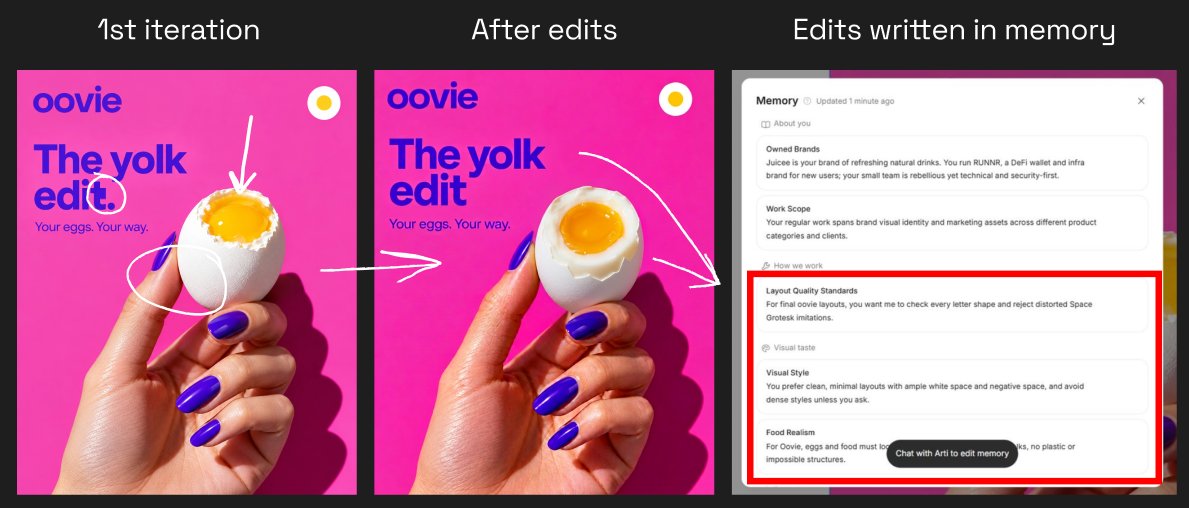
Agent sent me the 1st iteration → I liked the concepts, but needed adjustments → after my fixes, it remembered what I prefer in its Memory for the future tasks.
STEAL MY TEMPLATES
I adapted my oovie tasks into two templates you can use with your own brand.
Daily Moodboard answers “How could our brand look?” It turns real design references into visual directions for your brand. Brand Visual Radar answers “What could we say to our audience?” It develops content ideas, headlines, captions and a visual demo for each idea.
Set up your first task
- Open Delegated tasks and select New task.
- Paste one of the prompts and replace [CATEGORY]. For oovie, I used eggs and egg-based breakfast products.
- Select Add attachment → Select assets → Brand Kit and attach your approved identity.
- Choose Daily or Weekly, set the time, select the destination project and set a credit limit.
- Create the task. Use Run now to try the brief immediately.
You’re all set.
💡 Tip: For a client handover, include these tasks alongside the Brand Kit and first campaign designs. It gives them a repeatable way to explore the identity and work with it right away.

1. Daily moodboard
Save the prompt on GitHub Gist
Use this before a design session. Ask Arti to find real work in your category, explain what makes it interesting and explore those principles through your brand.
This is clearly your own Pinterest 2.0.
Prompt:
CATEGORY: [CATEGORY]

Act as a visual research partner for the brand in the attached Brand Kit. Use its approved identity and relevant brand Memory.

On each run:
1. Find up to three strong, real design references in this category: packaging, identity, photography, editorial or advertising. Prefer original brand and studio pages. Open the sources and inspect the images.
2. Give each reference an English title, its brand or creator, the exact source URL and one design principle worth exploring. Include actual reference images where supported, or direct image links alongside their sources.
3. Generate ONE board of original visual studies for the attached brand, with one panel per reference, labelled A-C. Explore the reference's composition, lighting, crop or material treatment through our own brand identity. Keep the brand's colours, visual character and tone. Create original interpretations.
4. Explain which reference informed each panel and recommend one direction to develop. Return the board's file link and actual dimensions.

Check available project history to keep each run varied. Keep research focused: up to two search passes and four source pages, then work with the examples verified. Strong evergreen design is welcome; include dates only when stated on the source. Copy source URLs exactly.

Write all commentary, display titles and generated copy in English. Generate one board, with no extra variants or video. Keep original brand assets intact and identify the output as visual studies for creative review. Leave publishing, Memory updates and schedule changes to the user.
Here's how it works:

2. Brand visual radar
Save the prompt on GitHub Gist.
Use this to prepare your next content plan.
Ask Arti to look at how brands in your category communicate, then develop ideas for your own audience - with headlines, captions and visuals.
3 content formats developed with Arti from category research:
- “choose your fav egg dish” post,
- a series built around audience requests,
- and a close-up guessing game
These ideas give you a practical base for the next content planning session. You just need to choose and polish them. ~90% of your time - saved.

Prompt:
CATEGORY: [CATEGORY]

Act as a social-content partner for the brand in the attached Brand Kit. Use its approved identity, available product assets and relevant brand Memory.

On each run:
1. Find up to three real social posts or campaigns in this category. Prefer original brand or agency sources. Open the examples and identify the content mechanism: what the audience is invited to notice, learn, answer or try. Include source links and actual reference images or image links where available.
2. Develop three original ideas for our brand. For each, give the audience occasion, the content premise, a suitable social format, a short English headline and a caption of up to 50 words. Use product facts confirmed in the Brand Kit.
3. Generate THREE separate 4:5 visual demos, one for each idea, using our brand identity and available assets. Make each image communicate its idea: a choice should show the options; a comparison should show both subjects; a guessing game should show a clear question and answer options. Give each format its own composition.
4. Review each demo against its premise. Return a table matching each idea to its headline, caption, image file link and actual dimensions. After showing all three, recommend one format to develop and include the exact research source URLs.

Check available project history to avoid repeating ideas and sources. Keep research focused: up to two search passes and four source pages. Recent work and useful evergreen examples are both welcome. Include dates only when visibly stated on the source, and copy URLs exactly.

Write all commentary, display titles and generated copy in English. Generate three demos in total, with no extra variants or video. Keep original brand assets intact. Leave publishing, Memory updates and schedule changes to the user.
Turn “branding” into “content”
A small business can have a complete brandbook and still need help creating its next post, banner or campaign. Someone has to interpret the guidelines, choose an idea and turn it into a design.
For an owner without a design background or a small team handling several jobs, that work is crazy difficult to keep up with.
People need help using the materials they already have and keeping content creation manageable.
Lovart can help here a lot. With the brand’s assets, guidelines and saved feedback available, Arti can research references, suggest content ideas and develop visual proposals.
That makes the brandbook useful in everyday decisions: what to create next, how it could look and which direction to use. Try one of my prompts above with a real task your business needs to get done.
Don't forget to:
- Save this article.
- Follow @AmirMushich
for more design / production breakdowns and workflows.
What would you create for your brand with Arti? 👀
Share your result in the comments - I’ll QT some of my favs.
↑ 正文结束 ✓ 本篇全文免费开放
会员可复制、下载全文 Markdown,还能让你的 AI 订阅和提问。 订年卡 $59/年看权益对比 →
📮 新解读每晚进邮箱
读完觉得有用?留个邮箱,每晚一封当天的新解读,随时退订。