Grok Bot 额度为什么烧得这么快:大部分 token 花在重读旧对话上,11 步省用量清单
原文链接: https://x.com/GrokBotRadar/status/2114409935345971231 来源: x.com 发现于: 小互 · AI 解读站 · 2026/10/26 说明: 本文由 AIHot 自动聚合(原文即中文,未翻译)。正文取自小互 AI 解读
全文 Markdown · 会员
作者:GrokBotRadar10-26 · 约 15 分钟
一位 Grok Bot 用户大约 23 小时就烧掉了半周额度。他让 Grok 读了自己导出的用量账单(CSV):约 9800 万 token 是缓存读取(cached re-reads),Bot 真正写出来的只有约 70 万。(缓存读取指模型把之前已经读过的对话内容再读一遍,用量 CSV 里能单独看到这部分)
Grok Bot 是 xAI 的常驻 AI 同事:每个 Bot 有自己的一段长对话,共用你账号下的一台云电脑,除了你找它聊天,还会被 routine 按时间或事件自动叫醒去干活。
他不是个例。另一位用户的账单显示 85% 的 token 是缓存读;第三位在约 7.09 亿 token 里,有 87.7% 花在让 Bot 反复阅读旧对话上。粉丝运营的 Grok Bot 资讯号 GrokBotRadar 也导出了自己的:9.65 亿 token 里 78% 是缓存读,Bot 实际写出东西只占约 1%。
你的 Bot 并没有把 token 花在深度思考或撰写内容上,token 里的大头花在了一件事上:每次被唤醒时,把整段历史对话从头到尾重新读一遍。缓存读在模型 API 计价里通常比新输入便宜,官方没公布每周额度怎样折算缓存读,所以八成 token 不一定等于八成额度;但重读量随唤醒次数和对话长度一起涨,这个关系不变。

三位用户的账单都显示,大头是重读旧对话,不是写东西。
85% 缓存读、87.7% 重读旧聊天记录、约 9800 万缓存读对 70 万写出;均为用户自己导出 CSV 后公开的数字。
在更新后的 X 订阅机制(X Subscription)下,这个问题变得更致命:Grok 应用、Grok Bot 与 Cursor 均从同一个每周额度池中扣费。xAI 和 Cursor 现在同属 SpaceX 旗下,Grok Bot 的用量记在 Cursor 账户上,帮助页也放在 cursor.com,所以 Cursor 员工会出来解释它怎样计费。X Subscription 的 Premium、Super、Ultra 才含 Grok Bot,Plus 不含;每周池用完后额外用量从预付费额度里扣。以前把代码任务扔给 Cursor 可以节省 Bot 额度的做法已经失效;Bot 在后台频繁重读一整夜,可能顺带把你整整一周的 Cursor 编程配额消耗殆尽。
真正要动的,是背后两个相乘的数。
算清乘数:为什么没聊几句额度就空了?
Grok Bot 的官方帮助文档指出了前半句规则:“每次运行都会消耗用量,因此高频运行的 routine(例程:按时间或事件自动唤醒 Bot 去干活的后台任务)比低频运行消耗更多。”
Cursor 员工公开说过后半句规则:每次回复都会重读 Bot 的整段对话,用户贴出的 CSV 就是这在账单上的样子。
这就构成了作者沿用的简化消耗公式(没算写出内容、浏览和工具调用):
每周用量 = 唤醒次数 × 每次重读量
每一次优化,本质上都是在压减这两个乘数中的一个,或者把检查和机械活挪出模型。
高频唤醒乘以长对话,量级放大得很快:
- 每 15 分钟运行一次:一周唤醒 672 次。
- 每小时运行一次:一周唤醒 168 次。
- 工作日每天运行 3 次:一周仅唤醒 15 次。
如果每次唤醒都带着整段对话,哪怕它每 15 分钟只是去检查一下网页并回复一句“暂无更新”,只要积累了数万甚至十万 token 的历史,它这一周也要把这段长对话完整重读 672 遍。
乘数一:多久唤醒一次 每 15 分钟672 次/周 每小时168 次/周 工作日每天 3 次15 次/周
乘数二:对话已经多长(每次要重读的量) 刚开的短对话约 5K token 聊了一阵约 40K token 拖了很久约 120K token
每次被叫醒后怎么开始 直接干完整任务每次都读整段对话 先查后跑Bot 自己查,没变化就停 脚本先查没变化 Bot 不醒
672 次唤醒 × 每次重读 4 万 token ≈ 2,688 万 token / 周
一个点 = 一次唤醒。实心点 = 把整段对话从头读一遍。
一周重读总量最坏组合的 33%
满格 = 每 15 分钟唤醒 + 12 万 token 的长对话(约 8,064 万 token/周)
一周醒 672 次,每次都把约 4 万 token 的对话从头读一遍。Bot 只回一句“暂无更新”,前面这些也照样要读。
唤醒次数按频率算出(原文给出的 672 / 168 / 15)。每次重读量、“10 次里 9 次没变化”都是教学假设;“先查后跑”按“停下的那次仍要读一遍对话”计(原文没说明是否如此),它省下的浏览和处理没有数据,图里不计。只看量级,不是官方计费方式,也不是你的账单。
动手优化前:先导出 CSV,但别迷信账单分类
在调整任何设置前,必须先看真实的用量明细。凭感觉猜测往往会修错地方。
在个人仪表盘路径中(grok.com/dashboard → 侧边栏 Usage),滑过每日 token 柱状图,在用量事件(Usage events)右上角点击 Export,即可下载一份用量 CSV 文件。
导出的 CSV 文件中每一行都包含你的账号邮箱。如果要将该文件交给 Bot 分析或求助他人,请务必先做脱敏,切勿直接公开发布原始文件。
把文件上传给你常用的总管 Bot(这是用户自己建的、负责接活并分派给其他 Bot 的那个 Bot,原文叫 chief of staff / director Bot,不是产品自带功能),发送以下提示词:
提示词:用量账单诊断
用在哪:首次导出用量 CSV 后发送给主力 Bot,排查整体消耗特征。
英文原版:
Check this usage file and analyze my bot behaviours and tell me how we should optimize for usage.
中文版:
请检查这份用量文件,分析我的 Bot 行为模式,并告诉我应该如何优化 token 用量。
在账单中,先看 Cache reads(缓存读取) 的比例,这就是你的重读占比。
不过,CSV 存在明显的分析盲区:作者导出的账单里既没有列出具体是哪一个 Bot 消耗的,也没有区分前台聊天与后台任务,你的文件可能也没有这两列。 有运行十几个项目 Bot 的用户自报,对话仅占其 11% 的 token,另外 89% 全被后台子任务和 routine 消耗。
如果需要进一步定位源头,可以继续追问:
提示词:排查低效 Bot
用在哪:在初步分析后,让 Bot 结合已知的配置上下文推测重灾区。
英文原版:
Which bot costs the most per useful result, and what should run less often?
中文版:
哪个 Bot 产出单个有效结果的成本最高?哪些任务应该降低运行频率?
由于 CSV 缺少分列,Bot 给出的归属判断只能作为排查线索,不能当作精密测量。验证优化的可靠方法是:先暂停所有定时 routine,记录当前每周配额百分比;接着针对真实任务分别用旧方法和新方法各跑 3 次,对比实际掉电速度。单次运行的数据很容易产生偏差。
压缩唤醒次数:重审定时任务,改用窄触发
官方帮助文档写得很直白:“每小时的定时日程、过短的时间间隔、或者在活跃的 Slack 频道挂监听,可以在一天内耗光一周的额度。”
审计定时任务是压低第一个乘数最立竿见影的动作。
提示词:Routine 定时任务全量审计
用在哪:定期梳理所有 Bot 的后台 routine,由总管 Bot 提出降频或改写建议。
英文原版:
Review all my existing routines.
For each one, check how often it runs, how many runs actually produce something useful, whether an event trigger could replace the schedule, and whether a quick check could decide if the full job needs to run.
Classify each routine as KEEP, SLOW DOWN, EVENT TRIGGER, CHANGE CHECK or RETIRE.
Rank them by potential usage savings.
Estimate usage before and after, accounting for any additional checks.
Show me what you can verify versus what you're estimating.
Don't make any changes until I approve.
中文版:
请审查我所有现存的 routine(定时任务)。
逐一检查:它的运行频率是多少、有多少次运行真正产出了有用结果、是否可以用事件触发(Event Trigger)替代定时轮询、以及是否可以通过轻量的前置检查来决定是否需要执行完整任务。
将每个 routine 分类为:保留(KEEP)、降频(SLOW DOWN)、改事件触发(EVENT TRIGGER)、加变化检查(CHANGE CHECK)或废弃(RETIRE)。
按潜在节省用量由高到低排序,并估算优化前后的用量变化(计入前置检查的开销)。
明确标出哪些结论是可验证的事实,哪些是推估数据。
在我明确批准之前,不要做任何实质修改。
用户 @0xKarmi 建议的触发频率通常够用:
- 收件箱分拣:每小时一次,或每天固定几次。
- 竞对动态与文档监控:每天一次。
- 数据报表:在固定时间跑一次。
- 系统审计:每周一次。
先从低频跑起,只有当低频确实漏掉了关键时效信息时,再考虑缩短间隔。
事件触发永远优于定时轮询。 Routine 可以由 Slack 消息、GitHub 通知或专用电子邮件触发。官方指南特别要求:“避免使用宽泛的监听规则,例如‘每条新消息’。”用户 @0xKarmi 举的例子最清楚:设置条件必须精准,不要监听技术大群里的所有消息,而应限定为“在 #deploys 频道中包含 FAILED 关键词的消息”。
对于那些结果你根本不会点开看的 routine,直接点击暂停。官方帮助页在用量掉得比预期快时给的第一条建议就是:暂停不需要的 routine,因为从未运行的任务不消耗任何额度。
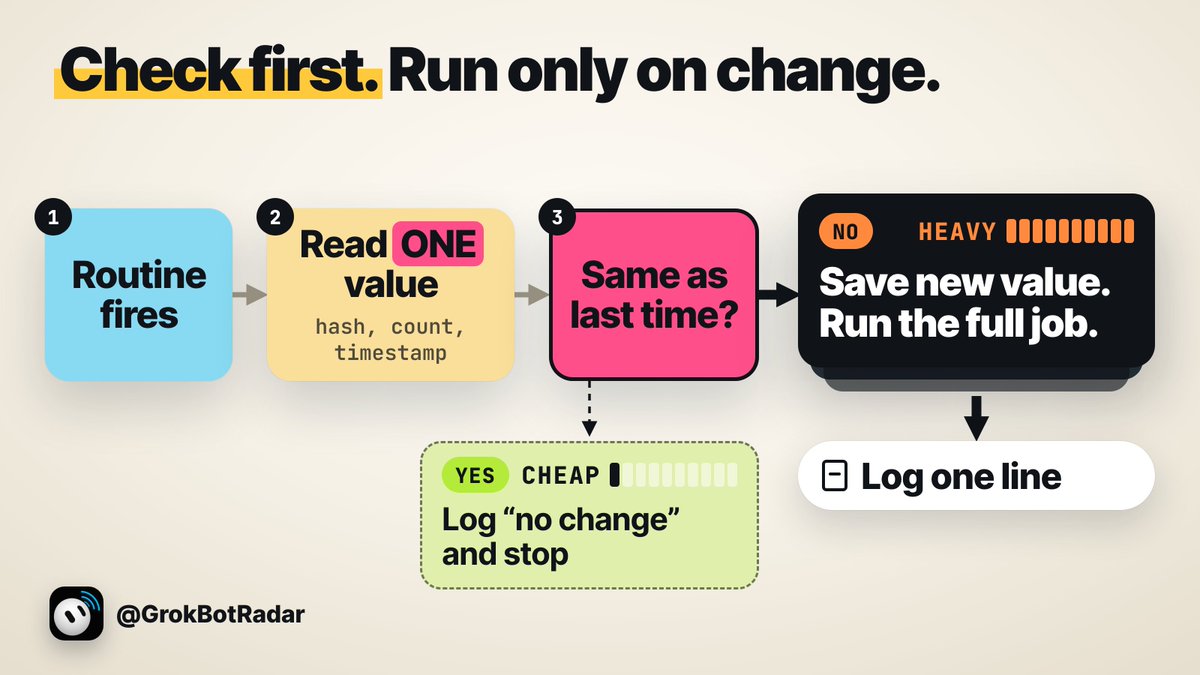
先查后跑:让大多数触发停在第一步
有些监控任务确实需要较高的时效性,且外部平台没有提供可挂载的 Webhook 事件。
这时不要去设法让整套流程跑得更轻,而要让绝大多数触发根本进不到深度执行阶段。
把这类 routine 拆解为两个阶段:
- 第一阶段(极轻量):仅读取单一基准值(如版本哈希、条目总数、状态字段或最后更新时间戳),并与 Bot 云电脑上上次保存的数值做比对。如果一致,在日志中写入“无变化”并立刻退出。
- 第二阶段(完整运行):只有当比对发现数值改变时,才执行抓取、解析和总结。
不过原文没说明提前停下的那次运行是否仍要读对话历史。这里有两种情况:如果停下的那次仍要读一遍对话,先查后跑省下的是浏览和处理,重读量照旧;只有像 @wavegod 那样把检查挪进脚本、没变化时 Bot 根本不被叫醒,才连重读也省掉。

高频监控拆成两步:没变化就记一行日志退出,有变化才跑完整任务。
第一步只读取并比对单一数值;相同则记一行日志直接停机,不同才保存新值并启动完整任务。
提示词:先查后跑前置指令
用在哪:粘贴在监控类 routine 的最开头,作为第一道过滤网。
英文原版:
Before doing any work, read only [the status field / latest commit / item count / last-updated date] and compare it to the value saved in routines/state/[name].txt.
If it matches, log no change and stop.
Don't open anything else.
Don't browse around.
If it changed, save the new value, then do the job.
中文版:
在开始任何工作之前,只读取 [状态字段 / 最新 commit / 条目数量 / 最后更新时间],并将其与保存在 routines/state/[名称].txt 中的数值进行对比。
如果一致,记录‘无变化(no change)’并立即停止运行。
不要打开任何其他页面或文件,不要四处浏览。
如果数值发生变化,保存新数值,然后再执行完整任务。
这套提示词中,“不要四处浏览(Don't browse around)” 是省钱的关键。多篇 routine 经验帖都提到这句,不加的话 Bot 打开页面后容易四处逛,检查又变回完整运行;但没人测过 Bot 遵守得多好,先看几天日志再信。
更彻底的做法是将前置检查完全移出大模型。开发者 @wavegod 把检查做成先于 Bot 运行的小脚本:退出码 0 代表没事,Bot 继续睡;退出码 10 代表唤醒;退出码 20 代表脚本自己坏了,也唤醒。脚本怎样先于 Bot 运行官方指南没写,这是这位开发者自己的搭法,不是产品功能。但他立下的规则很明确:只做简单的是/否检查,凡是发送、购买、发帖的动作一律不写进脚本。
在设计自动化时,养成一个基本原则:每一次任务结束时,都要留下一份让下一次运行成本更低的标记文件(如带有日期的基线数据或已比对列表)。
压缩重读体积:单任务单对话,状态存进文件
因为每次对话都会重读上下文全量历史,所以你使用时间最长、积攒轮次最多的那个聊天窗口,也是计费最贵的窗口。
始终坚持“一个独立任务一个对话(One job, one chat)”。
同一个 Bot 里开不了干净的新对话(官方的 + / New chat 是用来新建 Bot 或群聊的,用户对 + 菜单能做什么说法不一),也没有手动压缩。所以要靠三种办法重开:开局就把任务写窄、做完把状态存进文件;对话太臃肿就 Duplicate(复制出一个配置相同、但不带旧对话的新 Bot);反复做的事存成 skill(技能:写好的一套步骤,Bot 需要时才载入)。
提示词:单任务开局约束
用在哪:新开对话的第一条消息,严控 Bot 的探索范围。
英文原版:
Task: [what to do, in one line]
Where: [which app or file]
Use: [the context it needs, nothing more]
Done when: [the exact output]
Stop after that.
Don't research anything extra.
If you get stuck twice, stop and ask me.
中文版:
任务:[一句话说明要做什么]
位置:[在哪个应用或具体文件执行]
素材:[完成任务所需的上下文,不要提供多余内容]
完成标准:[交付的具体结果]
完成后立即停止。不要展开任何额外调研。如果连续卡住两次,立即停下来向我提问。
当任务达成后,立刻将结论提炼出上下文:
提示词:状态存入文件
用在哪:单个任务完成时,将核心状态提取为独立文件,便于下次开启全新对话读取。
英文原版:
Save a short summary of this job to a file: what we did, the decisions, the file names, and the next step.
Max 10 lines.
Then tell me the file name.
中文版:
将本次任务的简要总结保存为文件:我们做了什么、关键决策、涉及的文件名以及下一步行动。
篇幅不超过 10 行。
完成后告诉我保存的文件名。
下一个任务直接指定读取该总结文件,而不是带着几十轮对话历史继续聊。
当一个 Bot 的对话已经非常臃肿时,官方文档记录的重置方式是 Duplicate:保留档案人设、设置、技能和 routine,但会丢弃对话历史、学到的记忆和附件。
复制前把让 Bot 记住的偏好和边界也写进状态文件,需要保留的文件放 /workspace。用户 @NorthstarBrain 的具体做法是:先让 Bot 把它知道的一切写进文件,Duplicate,再把文件交给副本,然后暂停旧 Bot 的 routine 并隐藏它。此外,官方指南也建议“对话转向另一项长期工作时,开一个 thread(对话里单独开出的子话题)或新 Bot”,但 thread 是否会跳过旧历史还没人公开测过,先测再依赖。
如果有反复执行的固定工作流,在短对话中跑通一次后,直接将其打包为技能:
提示词:沉淀为 Skill
用在哪:将短对话中跑通的标准化流程沉淀为通用工具。
英文原版:
Save this as a skill called [name].
Include the steps and rules.
中文版:
将这个工作流保存为名为 [名称] 的技能(skill)。包含具体执行步骤与规则。
下一次执行时,也可以在短对话或新的 Duplicate 里说“Run the [name] skill”,或者输入 / 选择调用。用户 @cf_ldj 估算,若在对话超过约 12 万 token 时用总结重开,他能省下约 37% 的用量;但这只是他自己的估算,不是基准测试。
别让一条消息叫醒所有 Bot,用不着的 Bot 改成技能
用户 @Karadokuy 曾把所有 Bot 放进一个群,他说每条消息都会唤醒每个 Bot;这种增长是成倍的(每多一个 Bot 多读一遍),大部分 Bot 根本与消息无关。后来他改为私信一个总管 Bot、由它拉具体的负责人进场,自称为其他 Bot 省下了三到四轮无关阅读。
正确的协作架构是:只与唯一的“总管 Bot”私聊对接,由它在必要时定向单点调用下游专员。
官方文档明确强调:“在每个工作阶段指定单一负责人。过多的并行交接会产生重复工作和干扰更新。”同时,在 Bot 间传递上下文时,遵循“只传文件路径,不传整段文本堆叠(Pass the path, not the pile)”的原则。让上游 Bot 将阶段产物写入独立文档,只把路径给下游,避免对话体积滚雪球。对于所有链式协作,必须设置硬性上限(如连续尝试 2 次无进展必须中断),防止两个 Bot 在夜间互相纠错打转。
更深度的精简是将非必要的 Bot 降级为 Skill(技能)。
每个常驻 Bot 都是一个会不断膨胀的历史记录载体和唤醒源。而 Skill 是一种预定义的文本执行步骤,只有当任务明确触发时才会被载入。据用户 @bfrench 的说法,在未调用时,Bot 仅能看到该技能的名称与简短描述,几乎不占用上下文空间。
一个实体只有在满足以下至少一项特征时,才需要作为独立的“Bot”保留:
- 拥有自己独立的 routine 定时任务或外部监听器;
- 拥有你不希望混进其他 Bot 对话的上下文;
- 是你要直接找它说话的频道或角色;
- 承担需要停放审批任务的工作台职责;
- 自带独立的连接器授权或登录凭证;
- 对话历史本身沉淀了不可替代的高频查阅价值。
如果以上都不符合,它就应该被整理成一份 Skill。
拆分子 Bot 并不是一种安全隔离机制。官方指南明确提示,不同的 Bot 界面只是**“独立的工作台表面,而非独立的安全边界”**,底层的云电脑文件与服务登录态在同一账户下是共享的。
同时应对账户资产做定期大扫除:检查是否存在失效的登录凭证(这极易导致 Bot 陷入彻夜重试循环)、停用重复编写的 routine,以及排查已归档但后台定时任务仍在运行的废弃 Bot。
连接器与命令优先于浏览器操作
官方指南建议:有可用的应用连接(app,即连接器)就优先用它,通常比点网页可靠。
打开浏览器模拟人类操作,本质上是大模型在后台不断截取屏幕图片、定位按钮坐标再执行点击,多轮下来消耗大量视觉和上下文 token。而一个连接器接口调用,仅相当于单次精准的 API 交互。
提示词:全局连接器优先准则
用在哪:写在 Bot 的常驻描述或首轮指令中,杜绝无脑启动浏览器。
英文原版:
For every task: use a connected app first.
Only open the browser if there's no connector for it.
Tell me when you had to use the browser, and why.
中文版:
对于所有任务:优先调用已连接的集成应用(Connector)。
只有在没有可用连接器时,才打开浏览器操作网页。
如果必须使用浏览器,请向我说明具体原因。
模糊的提示词会让模型通读所有内容。在 Grok Bot 团队的一次直播里,一句“reply to alex”让 Bot 把所有未结工单都读了一遍,而实际上直接给一个工单号就够了。
对于纯机械化的流程,应尽量下放给机器命令(CLI)处理。有用户监测图片处理工作流发现,图片放大(Upscaling)在 Bot 的云电脑上跑命令完成仅消耗了不足 1% 的额度,而使用模型生成和检查却消耗了 8%。极端案例是交易 Bot:用户 @ali0xbt 说他的 Bot 每周烧掉 612 美元,其中 441 美元只是在盯 BTC 跳动;他把盯盘改成普通代码,只在某个合约定价看起来有误时才唤醒 Grok,再砍掉过大的输入、重复回答和一个跑了一整夜的重试循环,同样的交易降到了 9.40 美元。这是他自报的数据,没人核实,但方向是对的。
合并池下的跨工具协同与夜间防坑
在统一额度池生效后,将重活分派给 Cursor 并不能免除 Bot 的配额压力,两者从同一账户扣费。但在同一个池子里,选择哪款工具依然影响消耗。Grok Bot 本身没有模型选择器,没法靠换便宜模型省额度;能切模型的是 Cursor 里的 Agent。用户 @HandsomeHank_ 实测了合并套餐上各工具每小时的周额度消耗(这是他个人的数据,第二周普遍更高):
- Grok Build CLI(xAI 的命令行编程工具):第一周约每小时 2% 周额度,第二周在 4.7 High(模型版本与推理档位)上约 3%;
- 普通 Cursor agent:约每小时 2.5%;
- Cursor 云端 agent:约每小时 3.3%,第二周在 4.6 Medium 上约 4.6%;
- Cursor 里的 Grok 4.7 medium:约每小时 1.3%。
在此机制下,使用 Cursor Agent 需要格外注意配置:将 Agent 模型从“Auto”明确切换到具体的 Grok 模型。 用户 @HandsomeHank_ 发现 Auto 选了 Claude,扣的是他的 credits(套餐外按量付费的额度)而不是套餐内用量,产生了一笔 4.95 美元的扣费。
如果选择调用外部独立工具(如自建的 Claude Code、Codex CLI 或开源模型),需明确权衡:外部工具有独立的账单体系,Bot 交出任务和读回结果本身仍然消耗用量,命令行登录态在当前环境对所有 Bot 均可见,免费模型不适合处理敏感内容;凡是发送、付款、删除的动作,都应留在主 Bot 内部并走审批。
凌晨 3 点的审批死局
如果在深夜跑无人值守的高频 routine,必须提前解决交互确认逻辑。
后台发起的敏感操作审批卡片约 10 到 30 分钟就过期。(官方指南写约 10 分钟,帮助中心 FAQ 写约 30 分钟)
假设一个每 5 分钟运行一次的 routine 需要人类审批,你在睡觉的 8 小时内,它会发起 96 次审批请求。每一次都会在超时后变成灰色的“Expired(已过期)”卡片,任何实际动作都不会被执行。你早上醒来只会看到满屏灰色的过期卡片:96 次运行照样花了用量,事情一件没办成。
夜间运行的 routine 只能预设两种结局:
- 始终允许(Allow):如果操作安全且此前已经批准过,过期的卡片上会提供“未来始终允许(Always allow this in the future)”,点击后只对以后生效,错过的那次不会补跑。
- 存为草稿(Draft):如果操作具有破坏性或不安全,让 routine 只存一份草稿,你早上吃早饭时再处理。
在后台无人值守的自动化里,“等待我确认”不是可用选项,它只会让 routine 陷入空转。测试运行会真干活(官方:A test run performs real work),会浏览、改文件、调用你的工具,请在副本上测试。此外,由于系统对每个 routine 仅保留最近 20 条运行历史,高频任务的运行状态应要求其自动向 Bot 云电脑上的 .log 文件追加写入单行日志,以便回溯完整的运行轨迹。
先拉好刹车,再记住重置时间
进入控制台账单页面(grok.com/dashboard/billing),将自动充值(Auto Top-up)关闭,或设置严格的月度追加额度上限。需要注意:官方在旧版套餐的帮助页写明,上限不是运行中途的硬停,已在干活的 Bot 可以超过上限把活干完;作者推测新订阅下同理。摸清自己每周额度池重置的具体时间点,把消耗巨大的繁重测试安排在额度刷新前的最后一天,也是保障额度利用率的实用技巧。
辨清数据真相:这不是升级套餐的理由
网上流传的“每月从 $397 降至 $33”、“8,640 次唤醒”、“少 89%”(这里的 89% 和前面那位用户的后台占比无关),都出自同一个按 Grok 4.6 API 单价与假设输入输出测算的理论模型,建模者说明过从未在 Grok Bot 账单上测过,官方帮助页也未给出额度池的具体大小;至于“token 少 8 倍”、“每个任务从 10 万降到 1.25 万”,归于一位不具名的前 xAI 方面工程师,同样没有给出实际测量数据。方向没错(频率越高越贵,先查能省),但美元数字不是你的账单,只信自己改动前后的每周百分比。
作者的判断是:额度烧得快,不是升级套餐的理由。更大的套餐买的是更大的一周,修不好一个整天被唤醒、每次都重读整段对话的 Bot。
降耗执行清单:按优先级落地的 11 个步骤

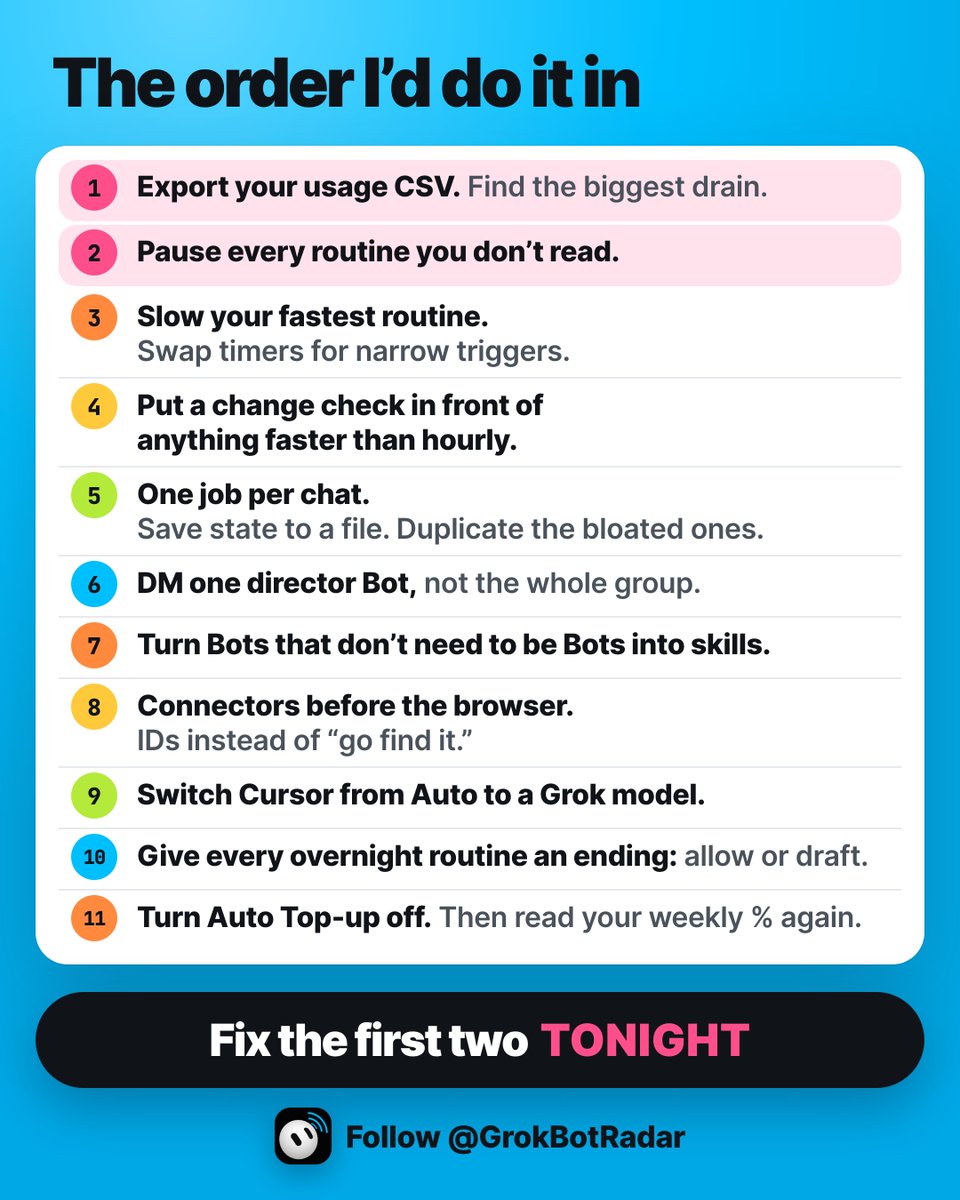
止住额度泄露的 11 步实操顺序。
从排查 CSV 诊断重读比例开始,逐步收窄触发、切分长对话;今晚务必优先执行前两步。
建议按照以下顺序逐步落地优化:
- 导出用量明细:下载用量 CSV 文件,确认你的缓存重读(Cache reads)占比,找出最大的消耗源头。
- 暂停静默定时:立即暂停所有你已经不看执行结果的 routine。
- 降频与事件收窄:将运行间隔最紧凑的 routine 频率放缓;能改用窄条件事件(Slack、GitHub 通知或带标签的邮箱)的,绝不使用周期轮询。
- 置入变化前置检查:对所有运行频率高于 1 小时一次的 routine,增加“先查后跑”逻辑,数值未变则立刻退出。
- 重构长会话:坚持一个任务一个对话;重要状态总结至云电脑文件;对话记录严重膨胀的 Bot 通过 Duplicate(克隆)彻底重置。
- 单一总管私聊分发:多 Bot 协作通过总管 Bot 点对点调度,不在群组内全员广播;交接只传文件路径,不传大段历史。
- 多余 Bot 降级为技能:对不需要独立常驻上下文和 routine 的辅助 Bot,全量重构为按需调用的 Skill。
- 连接器替代浏览器:优先调用集成连接器与命令行脚本,禁止无谓的网页视觉点击;传递具体单号与文件,避免模型全盘扫描。
- 修正 Cursor 路由:在 Cursor 中将 Agent 模型由 Auto 锁定到具体 Grok 模型,避免扣到套餐外的 credits。
- 明确夜间任务终局:为所有凌晨后台 routine 预设处理方案,安全操作配置为始终允许(Allow),不安全操作输出为草稿(Draft)。
- 设置财务安全阀:关闭自动充值(Auto Top-up),掌握每周额度池重置时间,对比改动前后的每周用量百分比。
实操带走包
滚动查看原始 Markdown,复制后可按团队实际系统与政策修改。 Markdown · 会员
正在载入 Markdown…
来源Most of Your Grok Bot Usage Is Re-Reading. Here's How to Stop Paying for It.GrokBotRadar(粉丝运营的 Grok Bot 资讯号)·查看主材料延伸Grok Bot plans and usage(帮助中心)·Grok Bot routines(帮助中心)·Grok Bot FAQs(帮助中心)·Approvals, security and privacy(官方指南)·Skills, routines and automations(官方指南)·Chat and collaboration(官方指南)本站说明原文由粉丝运营的资讯账号撰写,非官方。文中用户数据为各自在 X 上自报;官方说法已对照帮助中心与官方指南当前页面。
xAI Grok Bot & Cursor 额度透视
Grok Bot token 大头花在重读旧对话:如何避免为此付费
每次唤醒重新阅读全量上下文,乘以高频定时轮询,正在不知不觉烧空你的 Cursor 与 Grok 共享额度池。
核心机制拆解 · 账单证据 · 两阶段拦截与状态瘦身实操
一位 Grok Bot 用户大约 23 小时就烧掉了半周额度。当他导出账单 CSV 分析时才惊觉:约 9800 万 token 全是缓存读取(Cache reads),而 Bot 真正写出的内容只有约 70 万 token。这并非孤例,另外几份用户自报的账单(含资讯号 GrokBotRadar 自己的)也显示 78% 至 88% 的 token 花在让模型反复阅读旧对话上。缓存读在 API 计价里通常更便宜,官方没公布它怎样折算额度,所以 token 占比不等于额度占比。
98M : 0.7M 重读读取量 vs 实际写出量
78% - 88% 用户自报账单中的缓存读占比
672 次 15分钟任务每周累积唤醒
你的 Bot 并没有把 token 花在深度思考或撰写内容上,token 里的大头花在了一件事上:每次被唤醒时,把整段历史对话从头到尾重新读一遍。
**跨工具穿透扣费警示:**在更新后的 X 订阅机制(X Subscription)下,这个问题变得更致命:Grok 应用、Grok Bot 与 Cursor 均从同一个每周额度池中扣费。以前把代码任务交给 Cursor 节省 Bot 额度的做法已经失效;Bot 在后台频繁重读一整夜,可能顺带把你整整一周的 Cursor 编程配额消耗殆尽。
核心消耗机制 每周用量 = 唤醒次数 × 每次重读量
乘数 A:唤醒次数(Frequency) 受定时任务(Routine)执行频率或外部事件触发器密度直接决定。运行越密,唤醒次数就成倍增加。
乘数 B:单次重读量(Context Volume) 受当前对话历史长度决定。Bot 每次只要回复或执行动作,就必须从头把整段对话通读一遍。
高频唤醒乘以长对话,量级放大极快。如果一个已经累积了数万 token 历史的 Bot 每 15 分钟只是去检查一下网页并回复一句“暂无更新”,它一周也要把这段长对话完整重读 672 遍:
每 15 分钟运行一次(定时轮询重灾区) 672 次 / 周
每小时运行一次 168 次 / 周
工作日每天运行 3 次(收件箱/监控低频触发) 15 次 / 周
压缩唤醒次数:重审定时任务,改用窄触发
官方帮助文档写得很直白:“每小时的定时日程、过短的时间间隔、或者在活跃的 Slack 频道挂监听,可以在一天内耗光一周的额度。”优化第一个乘数,最直接的做法是坚决停用盲目轮询,换用窄条件事件(Event Trigger)。
但对于必须高频监控网页或数据的任务,若外部没有 Webhook,不要去设法让整套流程跑得更轻,而要让绝大多数触发根本进不到深度执行阶段。
阶段一:极轻量比对(大多数触发停在这一步)
在 routine 开头只读取单一基准值(如版本哈希、条目总数、状态字段或最后更新时间),并与保存在云电脑 routines/state/[name].txt 的旧值对比。
若完全一致 → 在日志中记录“无变化”并立刻退出进程,不浏览网页。
阶段二:完整执行(仅在数值变化时进入) 仅当比对发现数值改变时,将新数值覆盖写入状态文件,随后启动抓取、深度推理、解析与通知。 若有实质变动 → 启动完整模型任务。
注意:原文没说明停在第一阶段的那次运行是否仍要把对话历史读一遍。如果要读,先查后跑省下的是浏览和处理,重读量照旧;只有把检查挪进脚本、没变化时 Bot 根本不被叫醒,才连重读也省掉。
压缩重读体积:单任务单对话,状态存进文件
因为每次对话都会重读上下文全量历史,所以你使用时间最长、积攒轮次最多的那个聊天窗口,也是计费最贵的窗口。
同一个 Bot 里开不了干净的新对话,也没有手动压缩按钮。想要压低第二个乘数,必须建立标准会话卫生体系:
01
单任务单对话(One Job, One Chat):开局用提示词严格限制范围(“完成后立即停止,不要展开任何额外调研”)。任务完成后,命令 Bot 将决策、涉及文件及下一步提炼为不超过 10 行的精简总结存入云电脑文件,下个任务直接读这份文件。
02
克隆重置臃肿会话(Duplicate):当对话历史过于庞大时,官方提供的重置手段是 Duplicate。它保留 Bot 的人设、设置、技能和 routine,但丢弃对话历史、学到的记忆和附件。复制前把核心状态存入 /workspace,再把状态文件喂给新副本。
03
把沉淀工作流降级为技能(Skill):跑通的标准化流程打包成 Skill。常驻 Bot 是持续膨胀的唤醒源;而据用户 @bfrench 的说法,Skill 在未调用时仅展示名称和简要描述,只有明确调用时才动态载入,几乎不占上下文。
在多 Bot 协作架构上,坚决避免群聊广播。只与唯一的“总管 Bot”私信对接,由其单点分派下游;下游交接时坚持“只传文件路径,不传整段文本堆叠”,彻底杜绝上下文滚雪球。
夜间防坑与额度安全阀
如果打算让高频 routine 在夜间无人值守运行,必须提前破解审批交互陷阱:
凌晨 3 点的审批死局
后台发起的敏感操作审批卡片约 10 到 30 分钟就过期。如果一个每 5 分钟运行一次的 routine 需要人工确认,在睡着的 8 小时内,它会发起 96 次请求并全数超时变成“已过期”灰色卡片。96 次运行照常扣费,事情一件没办成。
**安全常规操作:**如果操作安全且此前已批准过,在过期卡片上点“未来始终允许(Always allow this in the future)”,只对以后生效,错过的那次不会补跑。
**敏感破坏操作:**指示 routine 仅生成草稿(Draft)并留日志,严禁后台等待确认。
财务安全底线:
立刻进入 grok.com/dashboard/billing 关闭自动充值(Auto Top-up),或设定严格的追加额度上限。在 Cursor 客户端中,将 Agent 模型从“Auto”明确指定为 Grok 模型,防止误走外部模型消耗按量付费的 credits。作者的判断:额度烧得快不是升级套餐的理由,更大的套餐只是一周更宽的配额池,修不好一个整天被唤醒、每次都重读整段历史的 Bot。网上流传的“$397→$33”“少 89%”出自按 API 单价的假设模型,不是你的账单,只信自己改动前后的每周百分比。
原文版权归原作者,这里只供对照阅读。 看原网页 ↗
Most of Your Grok Bot Usage Is Re-Reading. Here's How to Stop Paying for It.

One user burned half his weekly limit in about 23 hours.
Then he had Grok read his usage CSV.
About 98 million tokens were cached re-reads.
About 0.7 million were the Bot actually writing something.
He's not the only one. Another user's export showed 85% of his tokens were cache reads. A third found 87.7% of about 709 million tokens went to Bots re-reading old chat history.
So I exported mine. 965 million Grok Bot tokens since Oct 1. 78% were cache reads. About 1% was my Bots writing anything.
Your Bot isn't spending your week thinking.
It's spending it RE-READING.
And now that week is shared. On the X Subscription, Grok, Grok Bot and Cursor all draw from one weekly pool. One heavy Bot night can eat your coding week too.
Article #7 covered the first version of this problem. A lot has changed since. This one replaces it.
Here's the updated playbook. Ten fixes, ranked by payoff, with the prompts to paste.
Every platform fact below is checked against the official guide and help pages. Everything else comes from people posting their own setups and numbers in the last couple of weeks, and it says so.
Your week is wake-ups times re-read.
The formula from Article #7 still holds. Now the CSVs back it up.
How often your Bot wakes up.
How much it re-reads every time it does.
Multiply them. That's your week.
The help page says the first half plainly: "Each run spends usage, so a routine that runs often spends more than one that runs rarely."
Cursor staff said the second half in September. Every reply re-reads the Bot's whole conversation. The CSVs people posted this month are what that looks like on the meter.
Every fix below shrinks one of those two numbers, or moves the work off the model.
A lot changed since my last usage article.
Here's what's different on the X Subscription.
One pool. The help page: "Grok Bot usage draws from the same weekly pool as Cursor and the Grok apps, not a separate Grok Bot meter." It refreshes weekly.
Grok Bot starts at Premium. Premium, Super and Ultra include it. Plus doesn't.
Handing code to Cursor doesn't get it off your Bot's meter anymore. Same pool.
When the week runs out, extra usage comes out of prepaid credit.
You can finally see where it went. The Usage page in the Grok dashboard has an Export button. It shows how much was re-reading. It still won't tell you which Bot spent it.
Still missing: a model picker, and a manual way to compact a long chat.
Export the CSV before you change anything.
Guess, and you fix the wrong thing.
One of the most-saved usage tips lately came from @tejas3732. Over 1,000 bookmarks.
grok.com/dashboard, then Usage in the sidebar. Scroll past the Tokens per day chart. Hit Export, top right of Usage events. It downloads a CSV.
One warning. Every row has your account email in it. Don't post the raw file.
Upload it to your chief of staff Bot.
Paste this:
"Check this usage file and analyze my bot behaviours and tell me how we should optimize for usage."
He says it saves at least 10 to 15% a week. That's his claim, not a measurement.
The bigger win is what the file shows you. Look at the cache reads first. That's your re-read share. Mine was 78%.
What it won't show: which Bot, or chat versus background work. Mine has no column for either. One user running a dozen project Bots says chat was only about 11% of his tokens and about 89% went to background subtasks. That's his breakdown. Your file may not give you one.
If that's you, your chat habits aren't the problem. Your background work is. Routines, subtasks, Bots working for other Bots.
A sharper follow-up, from @agentools_sh:
"Which bot costs the most per useful result, and what should run less often?"
The file has no Bot column, so your Bot answers from what it knows about your setup. Treat its answer as a lead, not a measurement.
Then measure your fixes the honest way. @KanikaBK's method: pause your routines, write down your weekly %, run one real task the old way and the new way, three times each.
One run can lie.

Routines are still the first place to look.
The help page doesn't soften it: "An hourly schedule, a short interval, or a Slack trigger on a busy channel can use a week of usage in a day."
When my own Bot audited its usage, it found one routine firing 672 times a week.
That's what every 15 minutes adds up to.
Hourly is 168. Three times a weekday is 15.
Michael Fenech wrote the best routine audit going around. Condensed from his post, paste it into your chief of staff:
"Review all my existing routines. For each one, check how often it runs, how many runs actually produce something useful, whether an event trigger could replace the schedule, and whether a quick check could decide if the full job needs to run. Classify each routine as KEEP, SLOW DOWN, EVENT TRIGGER, CHANGE CHECK or RETIRE. Rank them by potential usage savings. Estimate usage before and after, accounting for any additional checks. Show me what you can verify versus what you're estimating. Don't make any changes until I approve."
Run it again every time your routine list grows.
Cadences @0xKarmi suggests, and they're usually plenty:
- Inbox triage: hourly, or a few times a day.
- Competitor pages and docs: daily.
- Reports: once, at a set time.
- Audits: weekly.
Start slow. Speed a routine up only after the slow one misses something real.
Better than any schedule is an event. Routines can start from a Slack message or a GitHub notification. Bots can now claim their own email address, and a routine on a tagged address runs only for that tag's mail.
Keep triggers narrow. The guide: "Avoid broad listeners such as 'every new message.'"
@0xKarmi's example says it best. Not any message in #eng. A message in #deploys that contains FAILED.
And pause what you don't read. The help page's first suggestion when usage falls faster than expected is pausing the routines you don't need.
Check first. Run only on change.
Some jobs need a fast clock and have no event to hook.
Don't make the full run cheaper. Make most runs never become full runs.
Split the routine in two.
Step one reads a single value. A hash, a count, a timestamp. It compares it to the last one saved.
Same? Log "no change" and stop.
Step two, the real job, only runs when something moved.
Paste this into the routine:
"Before doing any work, read only [the status field / latest commit / item count / last-updated date] and compare it to the value saved in routines/state/[name].txt. If it matches, log no change and stop. Don't open anything else. Don't browse around. If it changed, save the new value, then do the job."
That "don't browse around" line carries the saving. Several of the routine write-ups going around flag it. Leave it out and the Bot tends to wander once the page is open, and the check turns back into a full run.
Nobody has measured how well Bots stick to it. Read a few days of your log before you trust it.
You can go further and take the model out of the check. @wavegod built a Bot that turns yes/no checks into tiny scripts that run first.
Exit 0: nothing to do, the Bot stays asleep.
Exit 10: wake up.
Exit 20: the script broke, wake up anyway.
How a script runs ahead of the Bot isn't in the guide. Treat it as his setup, not a feature. His rule is the right one, though. Simple yes/no checks only. Nothing that sends, buys or posts ever gets scripted.
The Script This Routine template by @Kevin_Logan runs the same audit across all your Bots.
Then make every run pay it forward. @Solomonrojie's one rule:
"Every time you finish a job, leave behind something that makes the next run cheaper."
A dated baseline. Saved findings. Tomorrow's run starts further ahead.
One job per chat. State lives in files.
Every reply re-reads the whole chat. So your longest chat is your most expensive one.
One job, one chat.
There's still no clean "new chat" button for the same Bot. Users disagree on what the + menu does. So the reliable ways to start fresh are below: save state to a file, Duplicate, and skills.
Write the first message so the Bot doesn't wander. @KanikaBK's template:
"Task: [what to do, in one line] Where: [which app or file] Use: [the context it needs, nothing more] Done when: [the exact output] Stop after that. Don't research anything extra. If you get stuck twice, stop and ask me."
When the job's done, save the state outside the chat:
"Save a short summary of this job to a file: what we did, the decisions, the file names, and the next step. Max 10 lines. Then tell me the file name."
The next job starts from the file, not the history.
There's still no manual compact. The documented reset is Duplicate. It keeps the profile, settings, skills and routines. It drops conversation history, learned memory and attachments.
So move anything durable first. The guide says durable preferences and boundaries go in the Bot's description. Files that need to last go in /workspace.
@NorthstarBrain's version: have the Bot write everything it knows to a file, Duplicate it, give the copy that file, then pause the old one's routines and hide it.
The guide also says to "start a thread or a new Bot when a conversation has changed to a different long-lived job." Nobody has published whether a thread skips the old history. I'd test it before counting on it.
Turn repeat jobs into skills. Do the job once in a short chat, then:
"Save this as a skill called [name]. Include the steps and rules."
Next time, start from a short chat, or a fresh Duplicate, and say "Run the [name] skill." Or type / and pick it. That one's from @XStrangeHistory.
How long is too long? @cf_ldj estimates that starting fresh with a summary once turns passed about 120K tokens would have saved him about 37%. His estimate, not a benchmark.
Stop waking the whole team.
@Karadokuy had all his Bots in one group chat. He says every message woke every Bot.
Each one read it. Most had nothing to do with it.
His fix: DM one director Bot and let it bring in the owner. He says that saved his other Bots three to four rounds of unrelated reads.
The guide points the same way. "Ask for a single owner at each stage." "Too many parallel handoffs can create duplicate work and noisy updates." Use @everyone sparingly.
Pass the path, not the pile. Have each Bot write its result to a file and hand off only the file path.
And cap every loop. Two Bots can bounce revisions all night. @Solomonrojie stops a failed operation after 2 attempts and keeps the completed work. Do the same for handoffs: a hard cap, and stop after two rounds with no progress.
Some of your Bots should be skills.
Every Bot is another chat that grows, another set of routines, another thing to wake.
A skill is a written procedure any Bot can load when the job calls for it. @bfrench, who turned four of his Bots into skills after an audit, says Bots only see a skill's name and description until they load it. That keeps context small.
His test: keep it a Bot only if it needs at least one of these.
- Its own routines or listeners.
- Context you want kept out of other Bots' chats.
- A channel or persona you talk to directly.
- A desk or approval role where work waits.
- Its own credentials or connectors.
- Heavy use where the history itself has value.
None of those? It's a skill.
One thing a second Bot is not: a security wall. The guide says the screens are "separate work surfaces, not separate security boundaries." Files and logins are shared either way.
While you're in there, run a bloat check. Brian Roemmele's optimizer Bot found a 2,500-message chat that needed a reset, two Bots failing because a login had dropped, an empty duplicate, and three Bots writing variations of the same routine.
A dropped login is a retry loop waiting to happen. Fix it once.
@bfrench's audit also turned up an archived Bot whose routine was still running every week. Check. Don't assume.
Connectors and code beat the browser and the model.
The guide: "Prefer a connector when one is available: it is often more reliable than clicking through a website."
Browsing is screenshots and clicks, over and over. A connector is one call.
Tell your Bot once:
"For every task: use a connected app first. Only open the browser if there's no connector for it. Tell me when you had to use the browser, and why."
Then shrink what the model has to read.
A vague prompt reads everything. On a Grok Bot team stream, "reply to alex" made a Bot read every open ticket. A ticket ID would have done it. That's from @fffuckingnerd's recap of the stream.
Mechanical steps belong in commands. @stupiz tracked a full image workflow step by step. Upscaling ran as commands on the Bot's computer and used under 1% of his usage. Generating and checking the images used 8%.
The extreme version: @ali0xbt says his trading Bot was burning $612 a week, $441 of it just watching BTC ticks. He moved the watching to plain code, so Grok only wakes when a contract looks mispriced. Then he cut oversized inputs, duplicate answers and a retry loop that ran all night. Same trades, he says, for $9.40.
His numbers. Nobody has checked them. The direction is right.
Offloading moves the bill. Choose where it lands.
Grok Bot can hand heavy work to other tools. That only helps if the work lands somewhere else.
Cursor isn't somewhere else anymore. It's the same pool.
Inside the pool, the tool still matters. @HandsomeHank_ has been measuring it on the merged plan:
- Grok Build CLI: about 2% of his week per hour in his first week, 3% an hour on 4.7 High in his second.
- Regular Cursor agent: about 2.5% an hour.
- Cursor cloud agents: about 3.3% an hour, and about 4.6% on 4.6 Medium in week two.
- Grok 4.7 medium in Cursor: about 1.3% an hour.
One user's numbers, and still moving. He says everything looked heavier in week two.
His other catch matters more. On Auto, Cursor picked Claude and billed his credits instead of his included usage. He found a $4.95 charge.
Switch the agent from Auto to a Grok model.
Outside the pool, people are wiring in tools they already pay for. Claude Code on a Claude plan. Codex CLI. DeepSeek through Pi Agent or Claude Code. A free DeepSeek model through OpenCode for small jobs.
Be clear about what that is.
The other tool has its own bill and its own terms.
Your Bot still spends usage handing off and reading the result.
Command-line logins on the Bot's computer are shared by every Bot on your account.
Free models aren't for anything sensitive.
Anything that sends, pays or deletes stays with your main Bot, behind approval.
Decide the 3 a.m. ending before 3 a.m.
The guide: an approval requested by work that started without you, like a routine, a trigger or another Bot, "expires after about 10 minutes." The card shows Expired and the action doesn't run.
@0xKarmi did the math. A 5-minute routine that needs your yes asks 96 times over an 8-hour night. None of them run. You wake up to a stack of grey cards.
Every routine that runs while you sleep needs one of two endings.
Allow. The action is safe and you've said yes to it before. An Expired card offers "Always allow this in the future," which adds the rule for next time. It doesn't run the one you missed.
Draft. The action isn't safe. The routine saves a draft and you clear it over breakfast.
As @0xKarmi puts it, "wait for me" isn't a third option. It's a routine that does nothing and tells nobody.
Two more things the guide spells out.
A test run "performs real work." It can browse, change files and call your tools. Test on a copy.
The app keeps the 20 most recent run records per routine. On a 5-minute clock, that's under two hours. Have each routine add one line to its own log file, so you can see what actually ran overnight.
Set the brake. Then time the reset.
On the X Subscription, the brake lives at grok.com/dashboard/billing.
Leave Auto Top-up off. Or set a monthly additional usage limit under Additional usage credits.
One catch. For the legacy plans, the help page says a limit "is not a hard stop in the middle of a run." A Bot already working can finish past it. I'd assume the same here.
Then know exactly when your week resets. That tip comes via @SomeUKTeslaGuy: note the reset time, and line up your big jobs for the day before it.
The viral numbers are a yardstick, not your bill.
You've seen the posts. "$397 a month vs $33." "8,640 wake-ups." "89% less."
They trace back to one cost model. Grok 4.6 API rates, and an example run of 20K tokens in and 1K out. The people who built it say plainly it was never measured on a Grok Bot bill. And the help page doesn't give the size of the pool.
The direction is right. Fast clocks cost more. Change checks save.
The dollar figures aren't yours.
Same goes for "8x fewer tokens" and "100,000 to 12,500 tokens per task." One post credits an unnamed ex-SpaceXAI engineer. Another just says SpaceXAI documented it. Neither shows the measurement. Treat it as a claim.
The only meter that's real is yours. Read your weekly % before and after every change.
My take: none of this is a reason to upgrade.
A bigger plan buys a bigger week. It doesn't fix a Bot that wakes up all day and re-reads its whole chat every time.
The order I'd do it in.
- Export your usage and check your re-read share.
- Pause every routine you don't read.
- Slow your fastest routine. Swap timers for narrow triggers.
- Put a change check in front of anything faster than hourly.
- One job per chat. Save state to a file. Duplicate the bloated ones.
- DM one director Bot, not the whole group.
- Turn Bots that don't need to be Bots into skills.
- Connectors before the browser. IDs instead of "go find it."
- Switch Cursor from Auto to a Grok model.
- Give every overnight routine an ending: allow or draft.
- Turn Auto Top-up off. Then read your weekly % again.
Fix the first two TONIGHT. 🔧
Sources
Official guide and help pages:
- Help: Grok Bot plans and usage
- Help: Grok Bot routines
- Help: Grok Bot FAQs
- Official guide: skills, routines and automations
- Official guide: Bots
- Official guide: chat and collaboration
- Official guide: the computer and apps
- Official guide: approvals, security and privacy
- Official guide: settings and notifications
- Grok Bot changelog
Earlier in this series:
Usage CSVs and measurements:
- @DolphinRoadster, 50% of the week in about 23 hours
- @Levi_J_Peng, 85% cache reads
- @cf_ldj, 87.7% re-reading old history
- @hongfaqiu, 89% background subtasks
- @HandsomeHank, week 1 on the merged plan
- @HandsomeHank, week 2 on the merged plan
- @stupiz, usage per workflow step
Setups and prompts:
- @tejas3732, usage CSV audit
- @agentools_sh, cost per useful result
- @KanikaBK, measuring and first-message template
- Michael Fenech, routine audit prompt
- @wavegod, scripted yes/no checks
- @cu30rry, list including Script This Routine
- @Solomonrojie, make the next run cheaper
- @Solomonrojie, HANDOFF.md and the 2-attempt stop
- @NorthstarBrain, Context + Clone
- @XStrangeHistory, save it as a skill
- @Karadokuy, DM one director Bot
- @bfrench, Bots that should be skills
- Brian Roemmele, Grok Bot Optimizer
- @fffuckingnerd, three leaks from the team stream
- @ali0xbt, watching moved to code
- @SomeUKTeslaGuy, time the reset
- @0xKarmi, the routine clock and the 3 a.m. problem
- @Greshamtrade, the 8x claim
Offloading:
- @fankaishuoai, Pi Agent and DeepSeek
- @luchoorocker, Claude Code with Slack wake-ups
- @leaf_sanren, Grok CLI and Codex CLI
- @yurshevv, Claude Code on DeepSeek Flash
- @stansKoya, OpenCode on free DeepSeek
↑ 正文结束 ✓ 本篇全文免费开放
会员可复制、下载全文 Markdown,还能让你的 AI 订阅和提问。 订年卡 $59/年看权益对比 →
📮 新解读每晚进邮箱
读完觉得有用?留个邮箱,每晚一封当天的新解读,随时退订。